The entries that matter in a ship's log (position, course, speed, wind, weather, barometer, engine and events) and how to write them.
Photo: Katja Ano, Unsplash
A good logbook entry answers four questions: when, where, how and what happened. In practice that means the time, the position, course and speed, wind and weather with the barometer, the engine, and any event worth remembering. Here is what each one is for and how to write it.
| Time | Position | Course | Speed | Wind | Baro | Remarks |
|---|---|---|---|---|---|---|
| 09:10 | Burgstaaken | – | – | SW 3 | 1016 | Cast off, engine on |
| 09:35 | 54°24.6′N 011°13.0′E | 180° | 5.2 kn | SW 3 | 1016 | Sails up, engine off |
| 11:00 | 54°22.1′N 011°05.4′E | 245° | 6.1 kn | W 4 | 1014 | Rain shower, good visibility |
| 12:20 | 54°20.4′N 010°59.2′E | 250° | 6.6 kn | W 5 | 1013 | First reef in the main |
| 12:50 | 54°22.6′N 010°59.8′E | 015° | 4.8 kn | W 5 | 1012 | Sails down, engine on |
| 13:05 | Heiligenhafen | – | – | W 5 | 1012 | Moored, engine off |
Time
Write the time first, always. Use one time reference for the whole trip (local time or UTC) and note which one at the top of the page.
Position
Latitude and longitude from the GPS, in the same format every time (for example 54°26.3'N 011°11.8'E). Close to land, a bearing and distance to a landmark is just as useful: "2.1 nm SW of Fehmarnsund bridge".
Course and speed
| Entry | What it means |
|---|---|
| COG | Course over ground: where the boat actually goes |
| Heading | Where the bow points: what you steer |
| SOG | Speed over ground, from GPS |
| STW | Speed through the water, from the log |
| Log reading | Total distance on the log, to work out distance sailed |
The difference between COG and heading, or SOG and STW, is current and leeway. Logging both shows you how much the water is moving.
Wind and weather
- Wind: direction it comes from and strength, in knots or Beaufort. Note true wind, not apparent. See True vs apparent wind.
- Sea state: a word or a number on the Douglas scale.
- Weather: cloud cover (in okta if you like), rain, fog, visibility.
Barometer
Note the pressure in hectopascals at regular intervals, and the trend. A single reading tells you little; the change over three hours tells you a lot. A steady fall is the classic warning sign of more wind.
Engine
Engine on and off with the time, and the hour meter at the start and end of the day. That gives you fuel planning, service intervals and the split between sailing and motoring. More in Logging engine hours.
Sails and events
- Sails set, reefed or changed
- Tacks and gybes on a longer beat or run
- Departure, arrival, anchoring, mooring
- Crew and watch changes
- Sightings, problems, repairs, radio contact
What an app records automatically
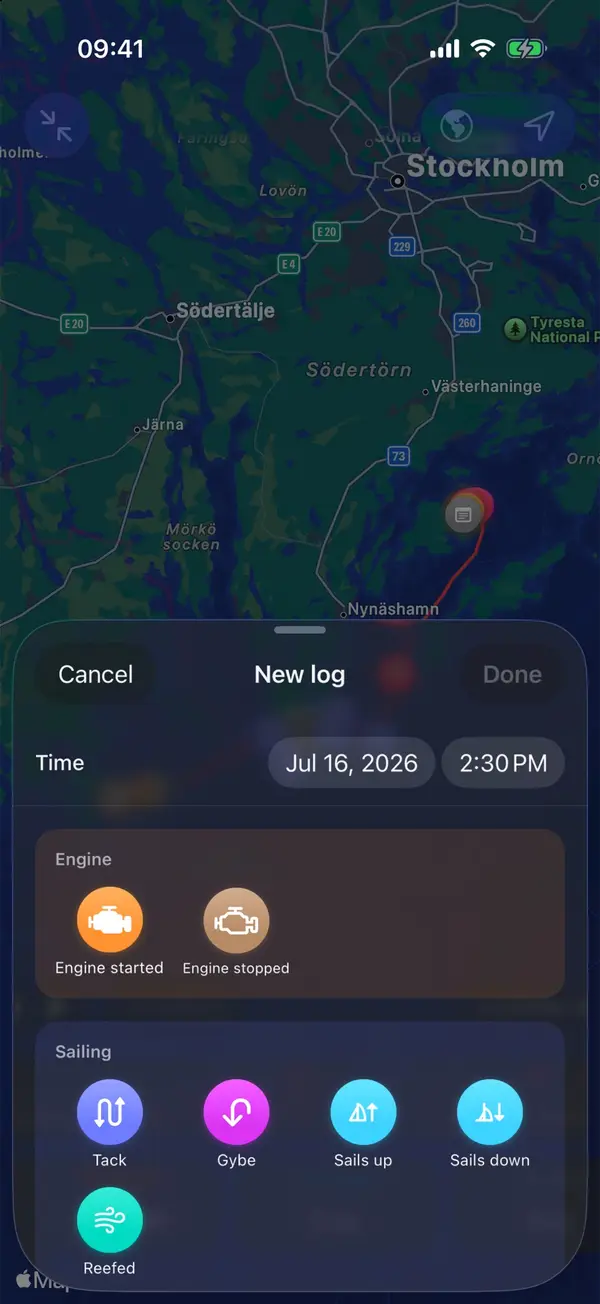
Much of this can be recorded for you. Manta writes departure, arrival, tacks, gybes and anchoring into the log on its own, and notes the weather for every hour of the trip. With Manta Pro and your plotter connected, every entry also carries real wind, depth and speed through the water. Weather, sail changes, sightings and notes take one or two taps.
Questions
Do I need to write the position every hour?
On passages out of sight of land, yes. It is what you fall back on if the plotter fails. On a short coastal sail, position at departure, arrival and every course change is usually enough.
Should I log true or magnetic courses?
Either works, as long as you say which and stay consistent. Plotters usually show true courses; a steering compass shows magnetic ones.
Why log the barometer if I have a forecast?
The forecast tells you what was expected; the barometer tells you what is happening now. A steady fall over a few hours is an early warning of more wind, often before it shows in the sky.
What counts as an event?
Anything that changes the boat's situation or that you may need to explain later, such as sail changes, reefs, engine on or off, course changes, sightings, problems, contact with other vessels or the coastguard.
Manta does this for you
Log entries in one or two taps while sailing
Weather, sail changes, sightings, notes and photos take one or two taps. The buttons adapt to the moment, so the right one is always at hand.